For company secretaries
Resetting a member's two-step verification
When a director loses their phone or recovery codes, reset their second step from the Members page. They set up a new one the next time they sign in.
Updated
Tom has a new phone and didn’t move his authenticator app across. He’s used his recovery codes too. Priya resets his second step.
Before you reset
Make sure it’s really them asking. Call them on a number you already have rather than one in the email (for Tom, 0491 570 158), or speak to them in person. A reset is exactly what someone trying to get into a director’s account would ask for.
Reset it
- Go to Members.
- Open the ⋯ menu on their row.
- Choose Reset MFA.
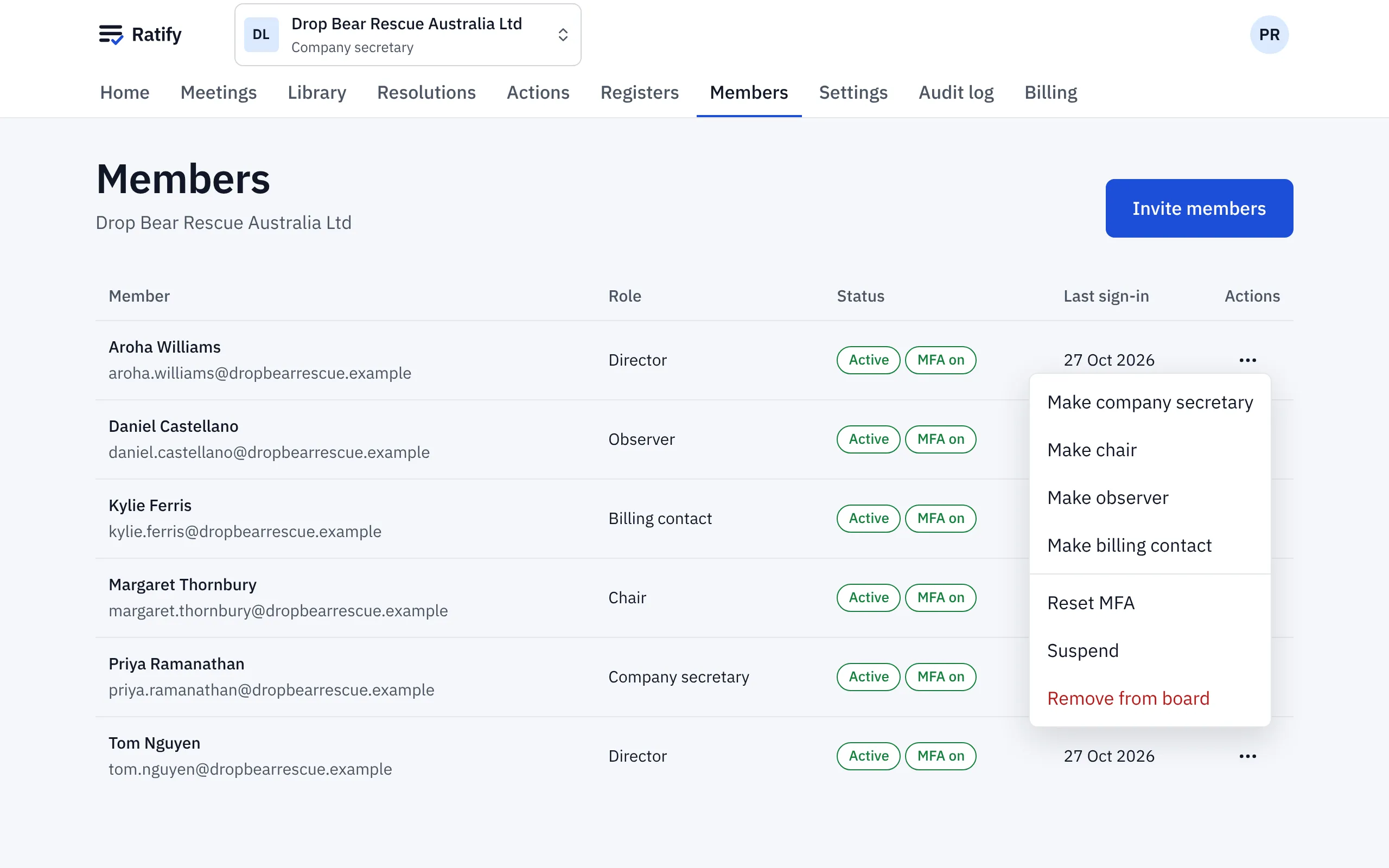
Ratify removes their passkeys, authenticator app and recovery codes and signs them out everywhere. We email them to say it’s happened. The next time they sign in, the way your board signs in (an email code, or single sign-on), they set up a new second step before they can see anything.
Ratify may ask you to confirm it’s you first, because a reset is a sensitive change. Every reset is recorded in the audit log, with who did it and when.
Related help
- Signing in to Ratify
Sign in with your email address and a six-digit code, then confirm it's you with a passkey or an authenticator app. No password to remember.
- Inviting members and choosing their role
Invite directors, the chair, observers and a billing contact by email, choose their committees, and change a role later from the Members page.